Control charts and Cpk without the $2,000 license.
Paste your measurements, or snap a photo of the check sheet, and get control limits, rule violations and Cpk in seconds, each with a plain-English verdict. Nothing to install, and your data never leaves your browser.
- Matches NIST worked examples
- 30-day refund, any reason
- Mac, Windows, any browser
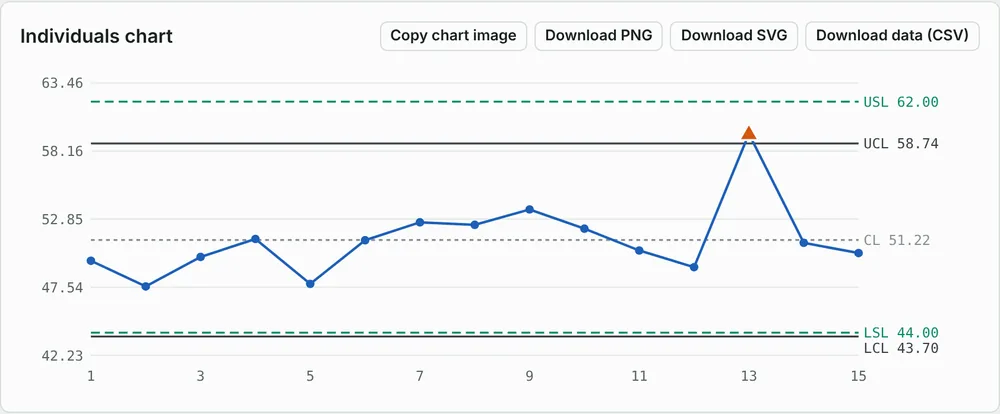
Paste, chart, read the verdict
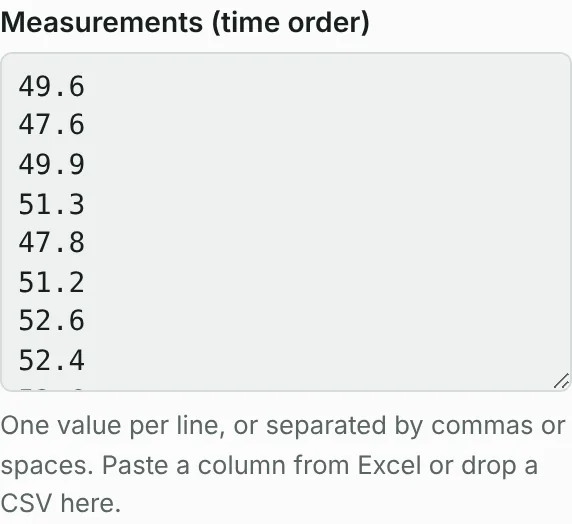
1 · Paste or scan your data
Paste a column from Excel or Sheets, drop a CSV, or scan a photo, PDF, Word or Excel sheet.
2 · See the chart
Control limits, spec limits and all 8 Nelson rules are checked instantly. Signals are marked on the chart.
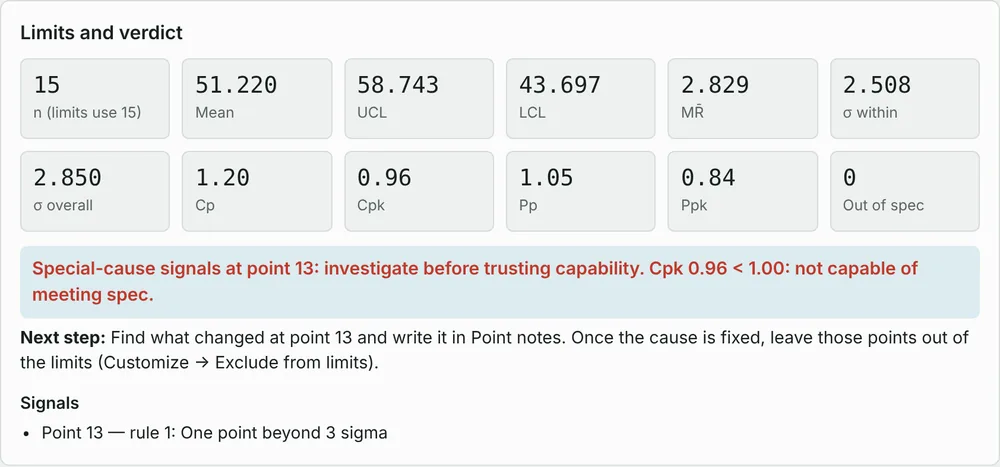
3 · Read the verdict
Cp, Cpk, Pp and Ppk with a plain-English verdict and the next step to take.
Checked against NIST's published examples
Every release runs an automated test suite that compares results to the worked examples in the NIST/SEMATECH e-Handbook of Statistical Methods. A release that fails a check doesn't ship.
Free forever, or Pro for one payment
Free
Charts
- I-MR charts and all 8 Nelson rules
- Cp/Cpk/Pp/Ppk and histogram
- Pareto and run charts
- "Which chart?" guide
Scan from image or file
- 1 free scan a day
Help
- Step-by-step guide, examples and a help assistant on every screen
Customize
- Your own titles, units, target line and Cpk goal
- Color-blind-safe and print chart styles
Export
- Copy results and chart images
+ 2 bonuses: quick-start guide, 10 example datasets
Use it free — no sign-upPro — founding license
Everything in Free, plus:
Scan from image or file
- Photo, PDF, Word or Excel data sheet, or a chart → numbers filled in
- 20 scans a day
More charts
- X̄-R and X̄-S subgroup charts
- p, np, c and u attribute charts
- EWMA, CUSUM, Laney P′/U′ and G charts
Analysis tools
- Hypothesis tests: t-tests, ANOVA, proportions, chi-square
- Regression with prediction intervals
- Gauge R&R (ANOVA method)
- 2-level DOE: design and analysis
- Capability for non-normal data
Lean · Toyota tools
- OEE with loss breakdown and an estimate of what fixing it is worth
- Takt time and line balance (Yamazumi)
- Kanban sizing, heijunka, standard work
- A3 report and Toyota Kata storyboard
Customize
- Limits from a baseline, excluded points, point notes
- Dates or lot numbers on the chart, ±1σ/2σ zones
Export
- Download PNG, SVG and CSV
Updates
- All updates through version 1
+ 10 bonuses, including 100 practice datasets with answers and report templates — see all
Get Pro — $29 one-timeSecure checkout hosted by Stripe · your card details never touch this site
Student
What you get
- Every Pro feature in the app
- Scan from image or file: 20 scans a day
Who it's for
- Students and Green or Black Belt candidates
+ 6 bonuses: practice datasets with answers, chart cheat sheet, project report template, 100-question practice quiz — see all
Get Student — $15Pro is unlocked for every buyer by November 1, 2026 — or a full refund. Refunds within 30 days for any reason.
All prices in US dollars (USD). Payments are processed securely by Stripe; sales tax, where it applies, is added at checkout.
Monthly plans for teams
Team
$51 a month for 3 users (3-user minimum)
or $510/year, 2 months free
Everything in Pro, plus:
Scan from image or file
- Unlimited scans
Save and sync
- Saved projects and chart history, synced across devices
Live data and alerts
- Live charts from a Google Sheet or CSV link, refreshed automatically
- Email alert when new data breaks a Nelson rule
Reports and sharing
- Scheduled PDF control-chart reports
- Share read-only chart links with your team
- Your logo on PDF reports; shared chart presets
+ All Pro bonuses for every seat, plus an SPC rollout kit — see all
Join the Team waitlistExpert
$58 a month for 2 users (2-user minimum)
or $580/year, 2 months free
Everything in Team, plus:
Automatic analysis
- Analysis report: chart choice, data checks, signals, capability and next steps in plain English
- Data-quality warnings: too little data, autocorrelation, non-normal data
Capability
- Capability report pack (one-page PDF)
History
- Version history for every saved chart
Support
- Priority product support
+ Everything in Team, plus DMAIC and measurement-study template kits — see all
Join the Expert waitlistMonthly plans open after Pro launches. No charge until they do. Cancel any time.
Bonuses with every plan
Every bonus is a download or a built-in feature, delivered with your license by November 1, 2026. Annual Team and Expert plans also get 2 months free.
| Bonus | Free | Student | Pro | Team | Expert |
|---|---|---|---|---|---|
| Quick-start guide (printable PDF) | ✓ | ✓ | ✓ | ✓ | ✓ |
| 10 example datasets | ✓ | ✓ | ✓ | ✓ | ✓ |
| 100 practice datasets with worked answers (chart choice, limits, verdict) | ✓ | ✓ | ✓ | ✓ | |
| "Which chart?" cheat sheet (printable) | ✓ | ✓ | ✓ | ✓ | |
| Project report template with an SPC section (Word) | ✓ | ✓ | ✓ | ✓ | |
| 100-question SPC practice quiz with explanations | ✓ | ✓ | ✓ | ✓ | |
| Industry dataset pack: manufacturing, healthcare, logistics, service | ✓ | ✓ | ✓ | ||
| Capability study report template (Word + Excel) | ✓ | ✓ | ✓ | ||
| Control plan and reaction plan templates | ✓ | ✓ | ✓ | ||
| Founding-member perks: early access to new charts for 12 months, roadmap votes | ✓ | ✓ | ✓ | ||
| SPC rollout kit: team procedure template, training slides, reaction-plan poster | ✓ | ✓ | |||
| Your logo on PDF reports; shared chart presets | ✓ | ✓ | |||
| DMAIC template kit: charter, SIPOC, fishbone, FMEA, control plan | ✓ | ||||
| Measurement-study worksheets (gauge R&R, bias, linearity) | ✓ | ||||
| Step-by-step lesson library: reading every chart and capability result | ✓ | ||||
| 2 months free on annual billing | ✓ | ✓ |
Published prices, side by side
| Product | Price (USD) | How you pay | Runs in |
|---|---|---|---|
| LimitLine Pro | $29 | One-time (founding price, then $49); free plan available | Any modern browser |
| SPC for Excel | $329 | One-time, per user (Capterra listing) | Microsoft Excel add-in |
| QI Macros | $379 | One-time, single user (qimacros.com) | Microsoft Excel add-in |
| SigmaXL | $399 | One-time, single user, first year of support included (sigmaxl.com) | Microsoft Excel add-in |
| Minitab Solution Center Core | $2,394 | Per year, single named user (minitab.com) | Desktop and web |
Prices as published by each vendor or listing, checked October 20, 2026; they may have changed since. These products include features LimitLine doesn't, so compare the tools you actually need. Product names are trademarks of their owners; LimitLine isn't affiliated with any of them.
Built from 109 real complaints about today's SPC tools
Reviews and forum threads about Minitab, JMP, SigmaXL, QI Macros, SPC for Excel and EngineRoom, sorted complaint by complaint. Two-thirds fall into four problems:
| What users complain about | Share | What LimitLine does |
|---|---|---|
| Price and licensing | 27.5% | Core charts and Cpk are free forever. Pro costs a fraction of a desktop license, with a student price. |
| Knowing which chart to use and what the result means | 19.3% | A "which chart do I need?" guide asks two or three questions and opens the right chart. Every analysis ends with a plain-English verdict. |
| Getting data in | 10.1% | Paste straight from Excel or Sheets, or drop a CSV file on the box. Header rows are skipped automatically. |
| Being tied to an Excel add-in | 9.2% | Runs in any modern browser. Nothing to install, nothing for IT to approve. |
How we counted: in October 2026 we read public reviews on Capterra, G2 and TrustRadius and threads on quality forums (Elsmar Cove, Zeiss), and coded each distinct complaint into one category; 109 complaints in total. Review sites lean positive and some reviews are vendor-solicited, so treat the shares as a rough guide, not a survey.
Everything here already works
Built, tested, and dated
- BuiltI-MR charts, 8 Nelson rules, Cp/Cpk/Pp/Ppk, histogram
- BuiltX̄-R and X̄-S subgroup charts (n = 2–25)
- Builtp, np, c and u attribute charts with variable sample sizes
- Built"Which chart?" guide, CSV drop, copy chart image
- BuiltAnalysis tools: Pareto, run chart, Capability+ (non-normal), hypothesis tests, regression, gauge R&R, 2-level DOE, EWMA, CUSUM, Laney P′/U′, G chart, each checked against NIST, scipy or statsmodels
- BuiltScan from files: PDF (text and scanned pages), Word tables, Excel sheets, CSV
- BuiltLean · Toyota tools: OEE, takt and line balance, kanban, heijunka, standard work, A3 report, Toyota Kata
- BuiltScan from image: number sheets (on-device reader) and graphs (click the scale, points found by color)
- Nov 1, 2026Pro unlocked for every founding and student license — or a full refund
- After ProTeam and Expert monthly plans: saved history, live data links, alerts, scheduled reports, automatic analysis reports
Before you buy
Can it read a photo of my check sheet?
Yes. Free includes 1 scan a day so you can try it; Pro and Student include 20 a day; Team and Expert scan without a daily limit. Printed, typed and screenshot tables read best. Messy handwriting is less reliable, so every number appears in an editable table before it is used, and doubtful cells are highlighted. For graphs, you click two gridlines and one data point and LimitLine finds the rest; in testing it recovered all 20 points of a chart to within 0.04 units. PDF, Word (.docx), Excel (.xlsx) and CSV files work too: typed files are read exactly from the file, with no guessing, and one file counts as one scan (CSV is free, like pasting). The reading happens on your device; nothing is uploaded.
Is my data uploaded anywhere?
On Free and Pro, no. All calculations run in your browser and nothing is sent to a server. On Team and Expert, only the projects you choose to save are stored, so they can sync and send reports. Privacy policy
Does it work on a Mac or a locked-down work laptop?
Yes — anything with a modern browser. There is nothing to install.
How do I know the numbers are right?
Every release is tested against NIST's published worked examples, and the formulas are shown on the page. Capability results assume a stable, roughly normal process, and the tool tells you when special-cause signals make capability unreliable.
Is this a replacement for Minitab?
For control charts, capability, and the everyday Six Sigma and lean tools (hypothesis tests, regression, gauge R&R, 2-level DOE, OEE), it aims to be. It isn't a full statistics package: there's no reliability analysis, response surfaces or Tukey comparisons yet, and it won't pretend otherwise.
Can my company use it for compliance?
LimitLine calculates statistics; it doesn't certify a process or replace a qualified engineer's judgment. Validate it against your own procedures before relying on it for regulated work.
How do I get the bonuses?
They come with your license: downloads appear on your receipt page and in the app by November 1, 2026. Monthly plans keep their bonuses while the plan is active; downloaded files are yours to keep.
Do I need a subscription?
No. Free stays free and Pro is one payment. Monthly plans are for teams that want saved history, alerts and automatic analysis reports.
What if I want a refund?
Email limitlinesupport@gmail.com within 30 days of a payment, for any reason, or any time if Pro isn't unlocked for you by November 1, 2026. See the refund policy.
Lock in the founding price
$29 one-time for the first 200 buyers, then $49. Pro by November 1, 2026 or a full refund.
Made by Nicholas Williford: Lean Six Sigma Black Belt · B.S. Business Administration · independent software developer. LimitLine is an independent product; views and products are my own and are not endorsed by any employer or government agency.
LimitLine is operated by Nicholas Williford, Kernersville, North Carolina, USA · Support: limitlinesupport@gmail.com
Terms of service · Refund policy (30 days) · Cancellation · Privacy policy